01 / THE IDEA
Recording the day.
Understanding what happened.
A camera can capture hours of activity, but answering a simple question about the day can still mean checking alerts and searching through footage. HomeMinutes begins with that everyday problem: “What actually happened at home today?”
The proposed experience is one readable evening recap, with a way to inspect the moment behind each sentence. A delivery, a visit or someone arriving home should be easy to find and understand.
The product concept pairs each event with its time and source image. When context is missing, it asks the household instead of presenting a confident guess.
02 / THE EXPERIENCE
Start with the evening.
Explore the moments behind it.
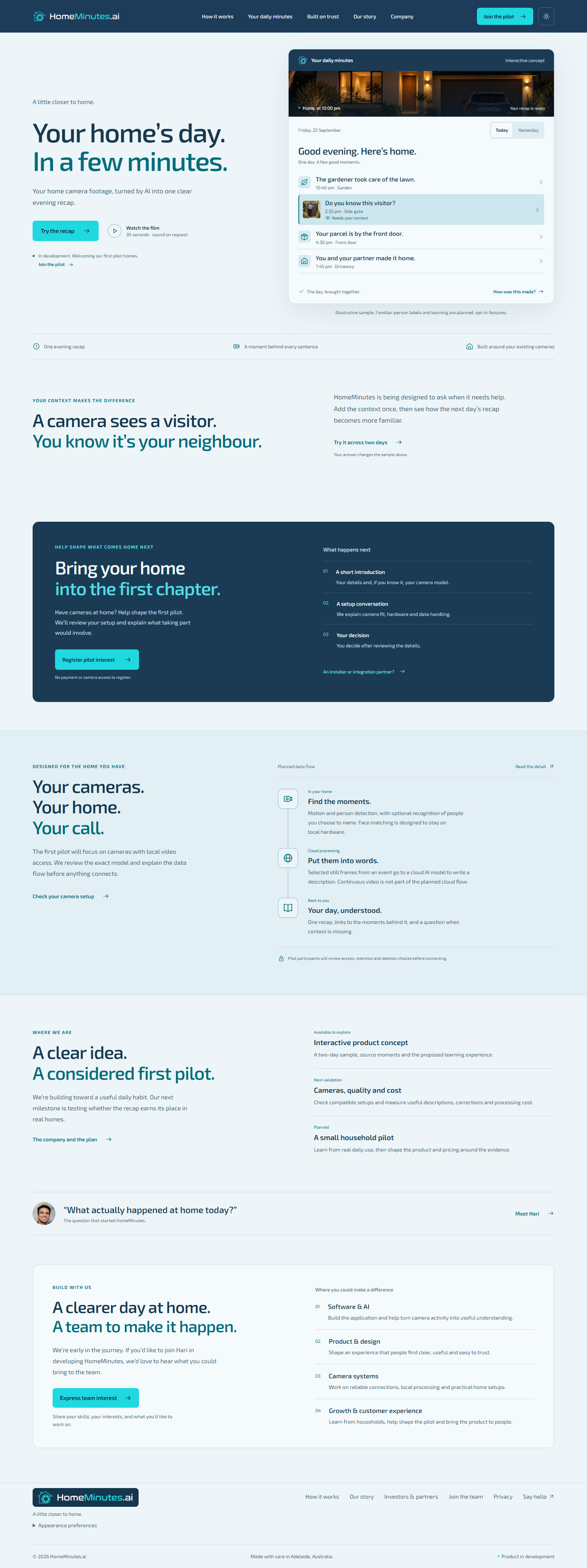
I designed the frontend around the outcome: a short recap that visitors can explore before reading about the proposed technology. A two-day fictional sample makes the intended interaction tangible.
- 01
Read the day
Switch between Today and Yesterday and scan a chronological recap of the garden, a visitor, a parcel and an arrival home.
- 02
Open the source moment
Select an event to inspect its supporting image and time. The sample demonstrates the connection between a short explanation and the moment it describes.
- 03
Add the missing context
Identify the sample visitor and see the next day’s wording change. This is an interface demonstration; persistent learning and real person recognition are planned.
03 / THE FRONTEND
One connected experience.
Across screens and states.
The current application uses React, Vite, React Router and CSS. The work includes the public website, interactive sample, responsive layouts, appearance controls and enquiry flows.
- Keep the sample consistentConnect the selected day, event detail and visitor-context answer so changes are reflected in the displayed recap. Sample interactions use prepared data rather than model inference.
- Make the interaction accessibleSupport keyboard navigation, mobile menus, visible focus, reduced-motion preferences and a film dialog with explicit playback controls.
- Explain the proposed productBuild dedicated pages for the solution, project story, company, privacy and contact. Keep development-stage labels alongside the product demonstration.
- Prepare the website for releaseProvide direct-page routing, responsive media, validated enquiry forms, light and dark appearances, and build and browser checks.
04 / DEVELOPMENT SO FAR
The experience is built.
The AI is still taking shape.
The frontend makes the product direction visible. Backend development is currently focused on a smaller task: testing whether a model can explain a still image captured from CCTV footage.
Available to explore.
A responsive website, a two-day interactive recap, source images, simulated context updates, a concept film and pilot-interest enquiries.
Open the websiteTesting one image.
Initial experiments with descriptions of CCTV still images. Reliable video explanations and a connected-camera workflow remain future milestones.
No measured accuracy or real-home pilot results are claimed at this stage.
- Responsive website & interactive sample
- Built
- Still-image explanations
- Experimental
- Local video-clip explanations
- Next
- Camera connection & event processing
- Planned
- Daily generated recaps & household pilot
- Planned
05 / THE PLANNED SYSTEM
From a camera event
to a readable explanation.
The proposed architecture starts with cameras that allow local video access. Local processing would identify relevant moments, selected still frames would be sent for model description, and the application would assemble a recap with source references.
- 01CaptureCompatible camera
- 02SelectRelevant moments
- 03ExplainSelected frames
- 04ReviewRecap + sources
Local clip analysis is the next stepping stone before connecting a camera.
Optional familiar-person recognition is a separate planned feature, with face matching intended to stay on local hardware. Camera compatibility, access, retention and deletion choices need to be established before a household pilot.
06 / TESTING USEFULNESS
A fluent description
still needs to be right.
A still image shows one moment. A video explanation must also account for what happened before and after it. Moving between those tasks requires explicit checks for missing events, unsupported detail and incorrect sequence.
- Ground each descriptionCompare the wording with visible evidence. Separate what the image shows from assumptions about identity, intent or relationships.
- Check the sequenceUse reviewed clips to assess whether the system follows an event over time and distinguishes an arrival, a wait and a departure.
- Measure the practical costRecord processing time, inference cost and the number of corrections needed before a recap is useful.
- Learn from actual useAsk pilot households whether the recap saves time and whether they can verify a questionable sentence using its source moment.
These are planned evaluation criteria. A repeatable benchmark and household-use results are not yet available.
Evaluation must establish the usefulness.
The current milestone is a dependable explanation of a small amount of footage. Wider camera support and automation should follow evidence from that narrower task.
07 / WHAT COMES NEXT
Build the next step.
Test what it adds.
- Improve still-image explanationsReview model outputs against the captured image and document the kinds of mistakes that remain.
- Explain local video filesMove to bounded clips, preserve time references and compare the explanation with the sequence of events.
- Connect one compatible cameraEstablish capture, event handling and the data flow with a controlled setup before expanding compatibility.
- Validate a small household pilotTest recap usefulness, corrections, processing cost and willingness to pay before expanding the product.